
1. Start with the role, not the template
Read the job description and list the qualifications you can support with evidence. For a student, that evidence might come from a course project or volunteering. For an experienced applicant, it may be a relevant responsibility or a result from a previous role. Requirements vary by employer and country, so follow the instructions for the role you are applying for.
Draft your contact details, education, work or project experience and relevant skills before polishing the layout. Tailor the content for each application rather than changing the job title alone. Show the skills the employer values through specific, factual language.
2. Choose a layout for your content
Seerti has 19 templates. You do not need to test every design: consider the length of your content, the requested language and how you will submit the application. A simple layout can work for different industries when the content and priorities are appropriate.
- Wadih is free after registration and email verification. It is a practical starting point when you want the text to do most of the work.
- ATS is a paid template with a layout intended for online applications. Its name does not establish compatibility with every applicant tracking system.
- Shabakah uses two columns. Check long job titles and the order of text copied from the exported PDF.
- Mirat is a bilingual option when both Arabic and English are appropriate. If the employer requests one language, provide that language.
Opening a preview does not unlock a paid template. You can buy paid templates through TuwaiqPay from your account. For help or to arrange a bank transfer, contact Seerti support on WhatsApp. You can also use Wadih or a template you already own. Compare the actual template options rather than relying on an ATS label or a promise of interviews.
3. Make your contact details easy to use
Use your professional name, an email address you check and a working phone number with the country code where needed. Add your city if location matters. Include a maintained LinkedIn profile or relevant portfolio, and test the links. A full street address is usually unnecessary.
Do not add identity numbers, banking details or marital status to a routine resume. Consider whether a photo, date of birth or another personal detail is actually requested and appropriate for the market. A field in a builder is an option, not an obligation. Leave unnecessary fields blank and use a secure application channel if an employer separately requires sensitive documents.
Demonstration contact line
Learning Example — Data Analysis Intern
Riyadh · example@example.test · Your maintained portfolio link
This address is a placeholder. Use contact details that belong to you.
4. Write a summary that adds information
A summary is optional. If it helps, use a few lines to connect your current stage, a relevant capability and the opportunity you are seeking. A generic claim such as “hardworking professional seeking success” adds little. The following examples are original and fictional:
University student — fictional example
Final-year information systems student who built a course project using Excel and Power BI to analyze synthetic sales data. Seeking a placement to develop reporting and data-organization skills, with experience documenting group work and presenting findings.
Recent graduate — fictional example
Accounting graduate with a training placement involving invoice matching and expense documentation. Uses Excel to organize review schedules and is looking for an entry-level accounting role requiring careful record keeping and follow-through.
Experienced applicant — fictional example
Operations coordinator with three years of experience tracking orders and producing recurring reports. Worked with colleagues to simplify a weekly reporting template and uses Excel to flag delayed requests. Interested in a role focused on reliable processes and cross-team coordination.
Do not adopt the examples’ placement, years of experience or tools as your own. If a summary only repeats your headings, you can begin with education or relevant experience instead.
5. Describe education, experience and outcomes
Education
List your qualification, field, institution and completion year. Label an expected graduation date clearly. Include a relevant project, course or grade when it is accurate and useful; a long list of unrelated modules makes the important details harder to find.
Fictional example: BSc in Information Systems — Example University (fictional), expected 2027. Course project: an order-tracking dashboard built with synthetic data.
Work and training
Within a section, put the most recent experience first. Give the role, organization and dates, then describe an action, its scope and the outcome you can support. Numbers are useful when you know their source; a specific description is still valuable without a percentage.
Vague: Responsible for reports.
More useful — fictional: Standardized order data in Excel and prepared a weekly report that helped the operations team identify overdue requests.
With measured evidence — fictional: Reduced a recurring report’s preparation time from two hours to ninety minutes by organizing the source data. Use a number like this only when you measured it.
No paid work yet?
Consider genuine projects, volunteering, research or training. A fictional example might be: “Coordinated tasks for a four-student course project and documented how we cleaned a synthetic dataset.” Label it as coursework, not employment. Include relevant project, research and volunteer experience in a student resume.
6. Select relevant skills and courses
Compare the role’s requirements with what you can actually do. “Creating pivot tables in Excel” is more informative than “expert in all office software.” Demonstrate communication or teamwork through a relevant experience rather than listing many unsupported personal qualities.
Describe language ability honestly. A template’s proficiency indicator is a presentation choice, not a verified test score. Be ready to use the language at the level you claim.
Choose courses that support your target role. Include the course name, provider and completion date when available. For example: “Introduction to Data Analysis — Example Training Provider (fictional), 2025.” Do not list a certificate you have not earned. Label ongoing study as in progress rather than completed.
7. Check readability, language and length
Keep headings, spacing and emphasis consistent. As a general starting point for Latin text, use readable body text around 10–12 points with slightly larger headings. This is not a fixed rule for every Arabic font. Review the file at its normal display size instead of shrinking the text simply to fit a page.
One focused page often works for a student or recent graduate. A second page can be useful when it adds relevant experience; an academic CV is a different document. Choose the length based on relevance and the amount of experience, rather than an absolute one-page rule.
Put education near the top when it is your strongest evidence, or lead with experience when that is more relevant. Enter Arabic and English content separately if you need both. Interface language switching does not translate your resume; check titles and dates across the two versions.
Open the exported PDF and inspect page breaks, text direction and clipped lines. Try selecting and copying the text to check reading order. That is a useful review step, not proof that every screening system will parse the document correctly.
8. Build your resume in Seerti: a visual walkthrough
You can browse templates first or enter your information before choosing a design. These screenshots show the actual Seerti interface with fictional data and the free Wadih template. A new account needs email verification. Never share a verification code.
Sign in to your account
Open the homepage and choose “Log in.” If you are new, choose “Create account,” complete the form and verify your email. Use an address you can access.
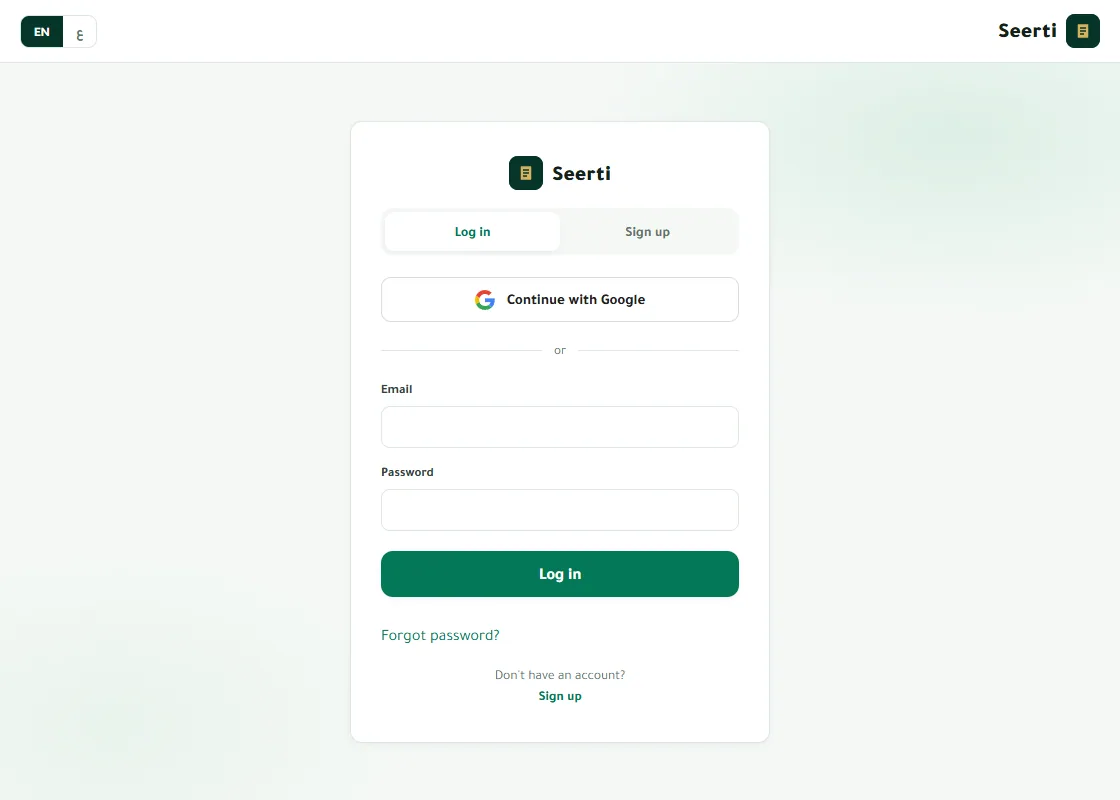
Sign in to your account in Seerti with fictional demonstration data Choose an available template
Open Wadih from “Templates.” You can return to “My details” to write your information and then reopen the preview. Paid templates require ownership before export; Wadih does not require a purchase.
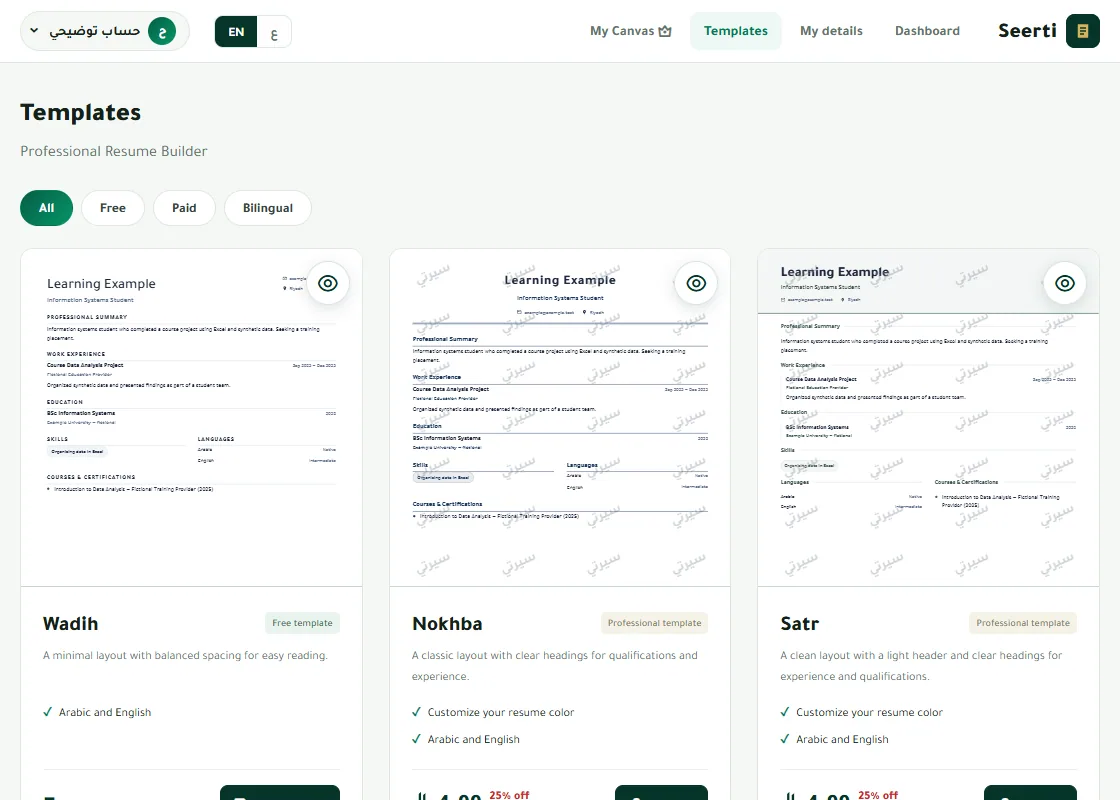
Choose an available template in Seerti with fictional demonstration data Enter your information
In “My details,” use “Next” or the section buttons to move through personal information, summary, experience, education, skills, languages and courses. Enter the language content you need and leave unnecessary fields blank.
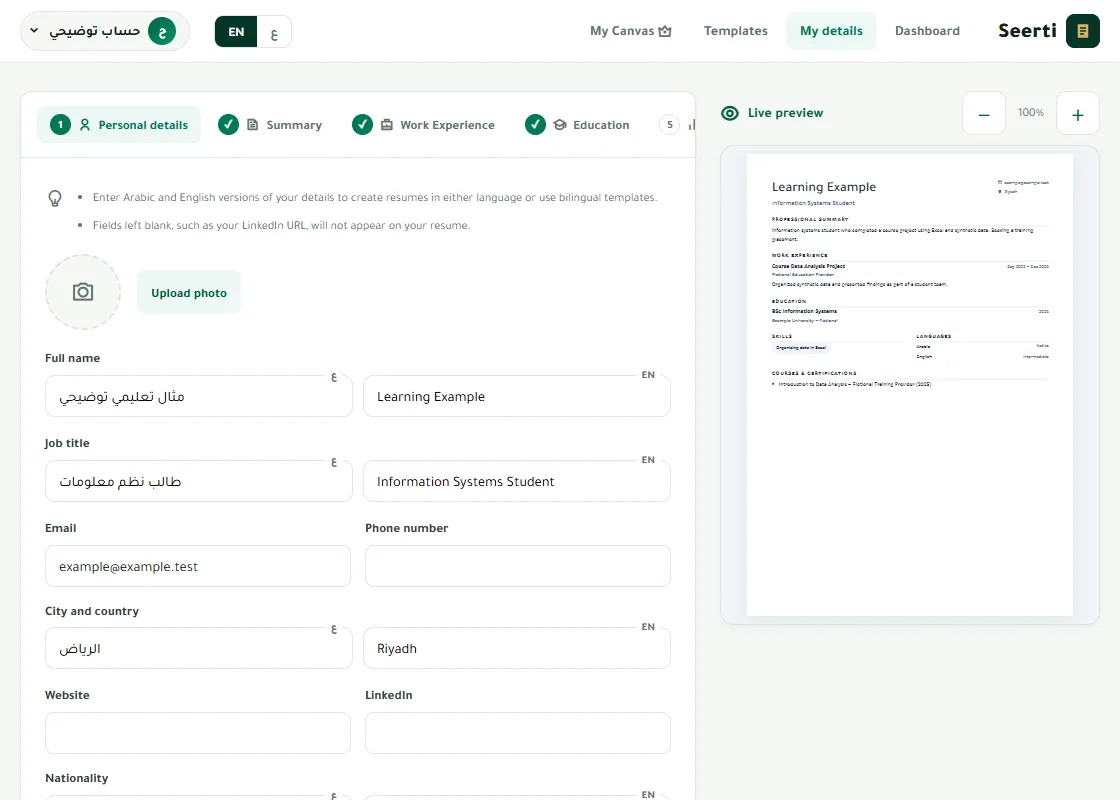
Enter your information in Seerti with fictional demonstration data Review the actual preview
Open your design from “Templates.” For single-language templates, choose Arabic or English in the preview. Check the real text and page breaks; a thumbnail alone is not a final review.
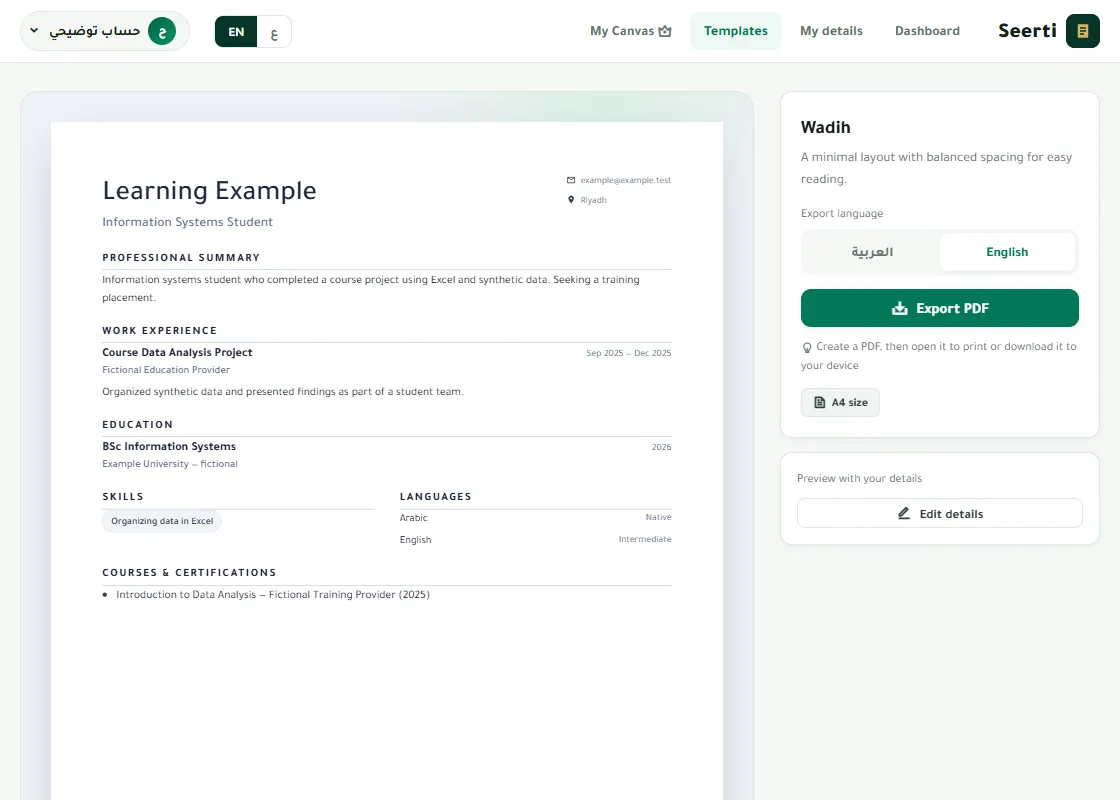
Review the actual preview in Seerti with fictional demonstration data Check autosave before leaving
Changes save automatically while you are connected. Wait for “Saved ✓,” then reopen “My details” to check that your information is there. If saving fails, keep a copy of your text and check the connection before moving on.
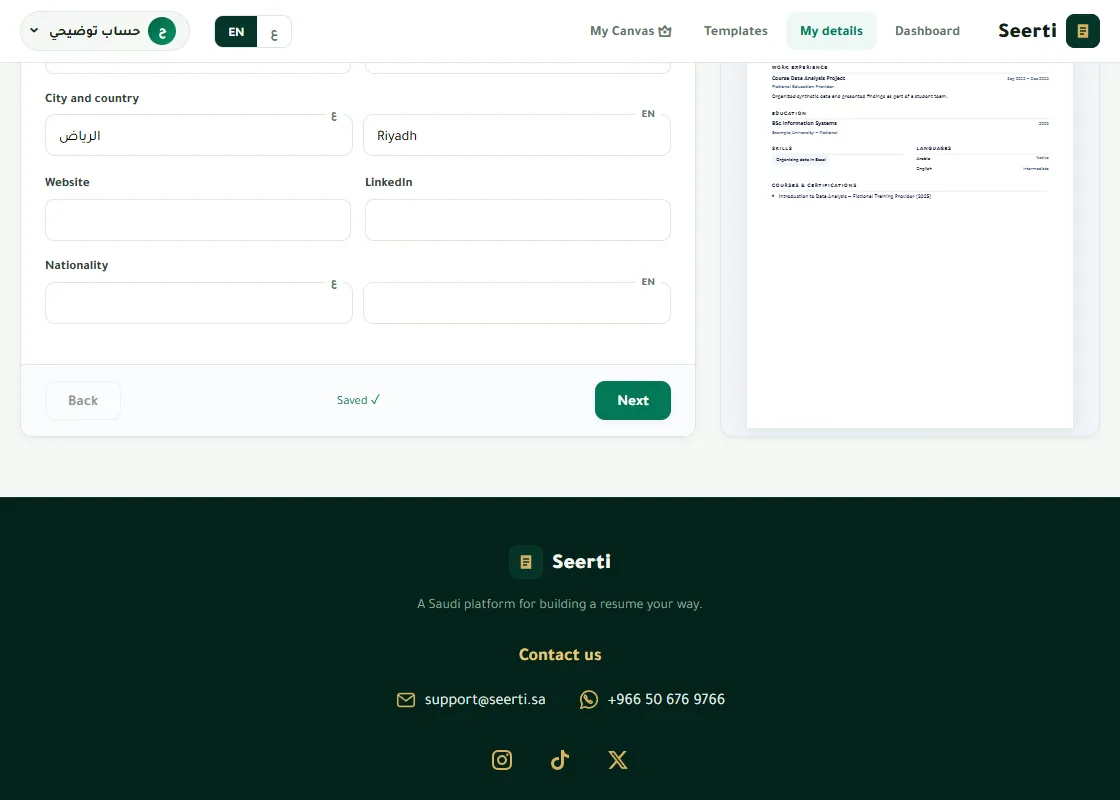
Check autosave before leaving in Seerti with fictional demonstration data Generate and download the PDF
In the template preview, choose “Export PDF.” When the file is ready, choose “Save PDF.” The print option opens the PDF for printing. Find the downloaded file in your browser downloads or Files app; the exact location depends on your device and browser.
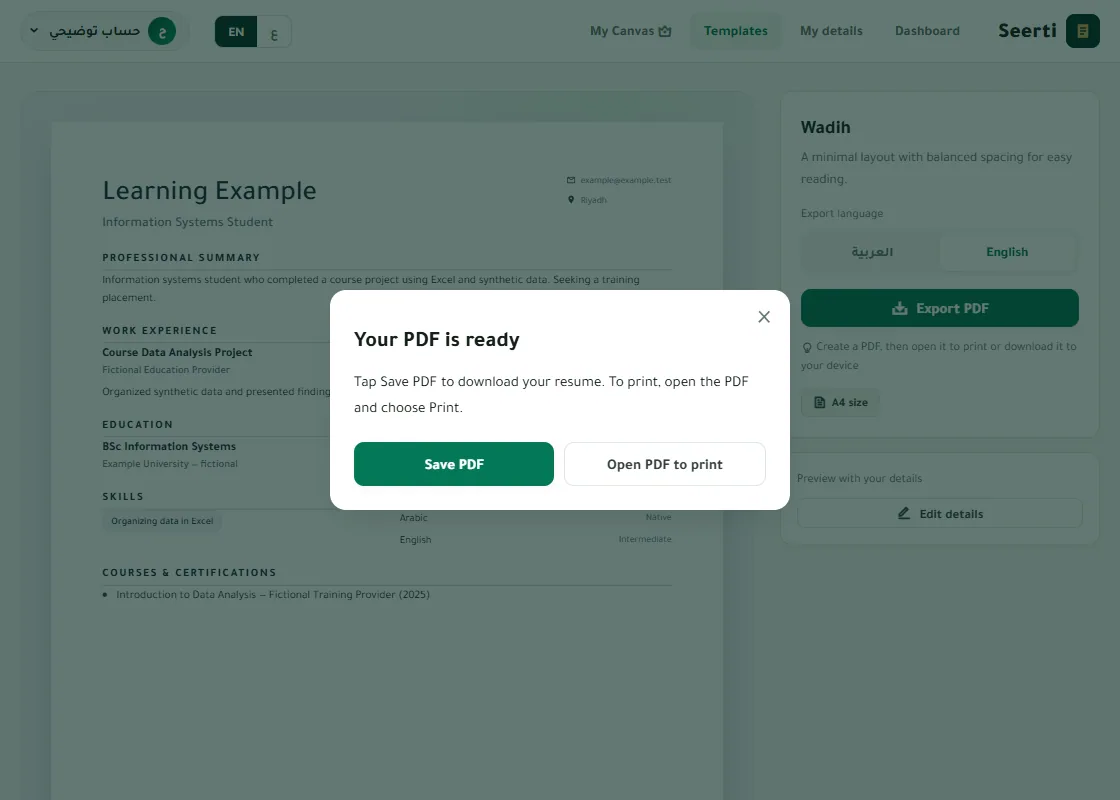
Generate and download the PDF in Seerti with fictional demonstration data


9. Avoid these common problems
- Typos and broken contact details: read once for meaning, then check names, dates, numbers and links separately.
- Borrowed achievements or unsupported skills: remove any statement you cannot explain honestly.
- Conflicting dates across sections or languages: use a consistent format and label current roles or expected graduation clearly.
- Keyword stuffing or hidden text: use the employer’s terminology only where it accurately describes your experience.
- Text that is too small or an orphaned line on a new page: remove repetition and review the page layout after editing.
- Sending an unchecked export: open the exact file you plan to send. Use a clear name such as “Name-Role-Resume.pdf” and avoid sensitive identifiers in the filename.
Before applying, ask: Can the employer contact me? Does this version show the evidence most relevant to the role? Is every claim accurate? Does the file open and remain readable at normal size?
10. Frequently asked questions
Which resume template should I choose?
There is no universally best design. Start with a readable layout such as Wadih, then consider your content, language and submission instructions. An ATS label is not a guarantee.
Does a resume have to be one page?
No. One concise page often suits a student or recent graduate; add length when it contains relevant evidence, not filler. Follow any page limit the employer specifies.
What can I include without work experience?
Use genuine education, projects, training, volunteering and applied skills. Identify coursework clearly instead of presenting it as a job you did not hold.
Can I download a PDF for free?
Yes. Wadih is available after registration and email verification. Paid templates require ownership. Buy paid templates from your account through TuwaiqPay. You can also use WhatsApp to arrange a bank transfer with Seerti’s management.
Is downloading a PDF the same as saving my resume?
No. Autosave keeps your editable account data. A PDF is a separate export and does not update when you edit the resume. Generate a new file after making changes.
Does Seerti translate my resume or export Word?
Automatic translation, AI resume writing and Word export are not currently available. Enter each language yourself and export PDF when that format matches the employer’s instructions.
Where is the PDF on my phone?
After choosing “Save PDF,” check browser downloads or your Files app. Your browser may offer an additional save or share step. Open the file and check it before sending it.